Changelog Widget vs Changelog Page: Which One Is Right for Your SaaS? | Announcify
guides6 min read
Changelog Widget vs Changelog Page: Which One Is Right for Your SaaS?
Jul 3, 2026
Ahmed Errami
Changelog Widget vs Changelog Page: Which One Is Right for Your SaaS?
You've just shipped a new feature.
Now comes the important question:
How do you make sure your users actually discover it?
Many SaaS companies invest weeks—or even months—building new features, only to announce them in a single email or bury them in release notes that few people ever read. As a result, users miss valuable updates, feature adoption stays low, and all that development effort goes unnoticed.
That's where changelogs come in.
A well-maintained changelog helps customers stay informed about new features, improvements, and bug fixes. But as you start building your product communication strategy, you'll quickly run into another question:
Should you use a dedicated changelog page, an embedded changelog widget, or both?
While both serve the same purpose—keeping users informed—they create very different user experiences.
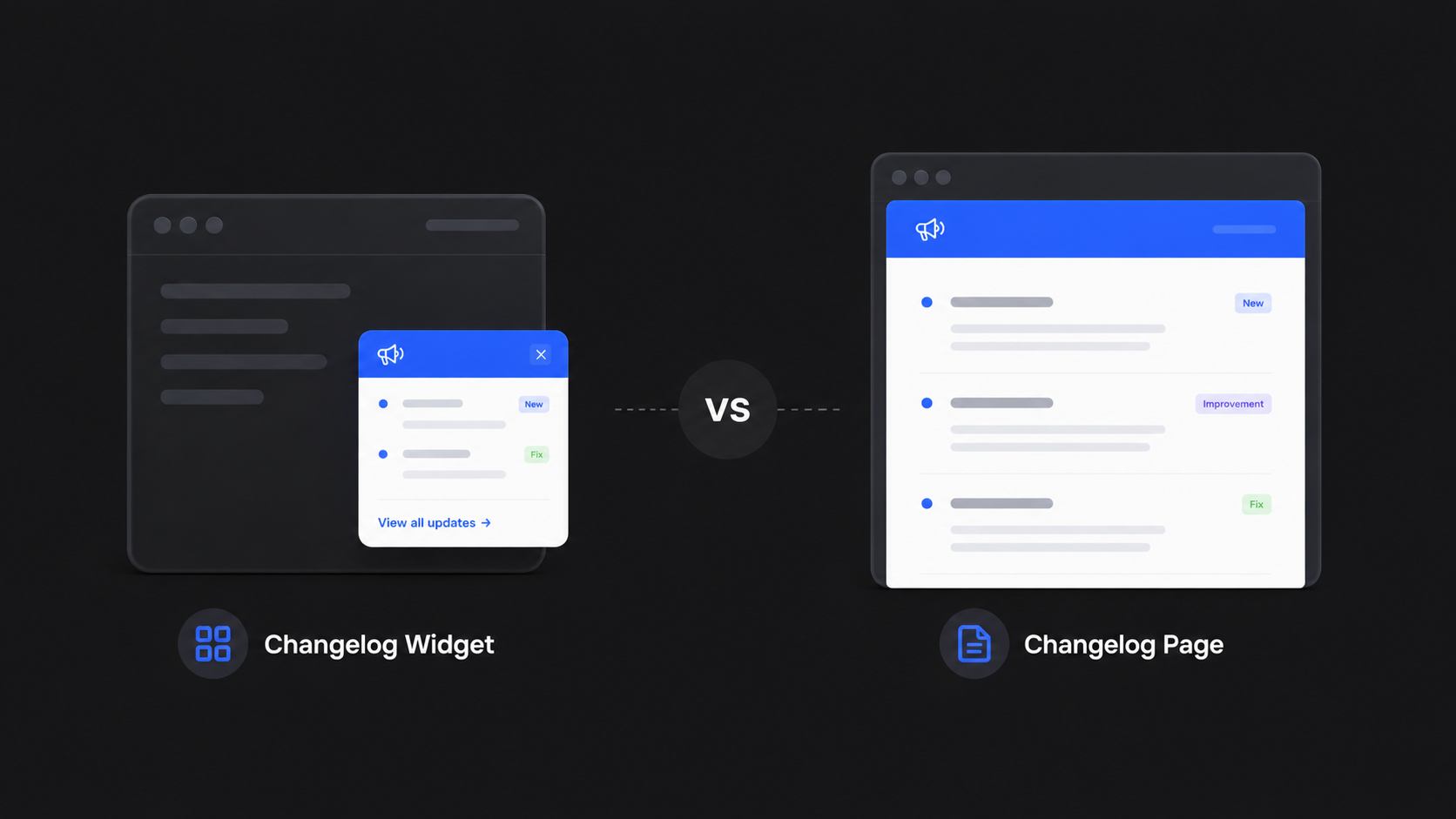
A changelog page gives users a central place to browse every product update, while a changelog widget surfaces new releases directly inside your application, right where users are already working.
Choosing the right approach can have a significant impact on:
In this guide, we'll compare changelog widgets and changelog pages, explore the pros and cons of each approach, and explain when you should use one—or combine both—to build a better product communication experience.
By the end of this article, you'll know exactly which solution fits your SaaS and how leading software companies keep customers informed about every release.
Why Your Changelog Matters More Than Ever
Shipping features isn't enough anymore.
Users expect products to evolve continuously, but they also expect to be told what changed and why it matters.
Without a clear way to communicate updates, even your best features can go unnoticed.
A well-designed changelog helps you:
Increase feature adoption
Reduce customer confusion
Highlight the value of every release
Build trust through transparent communication
Show that your product is actively improving
The challenge isn't deciding whether you need a changelog—it's deciding how users should experience it.
Let's start by understanding what a changelog page actually is and why it's still one of the most important communication tools for modern SaaS products.
What Is a Changelog Page?
A changelog page is a dedicated webpage that lists your product's updates in chronological order. It's a central place where customers can see what's new, explore previous releases, and understand how your product has evolved over time.
Think of it as a public timeline of your product.
Each entry typically includes:
A title summarizing the update
A description of the new feature or improvement
Images, GIFs, or videos
The publication date
Categories or tags
Links to related documentation or help articles
Many SaaS companies make their changelog publicly accessible so both existing customers and prospective users can see how actively the product is being developed.
Benefits of a Changelog Page
Complete Release History
Unlike emails or in-app notifications, a changelog page doesn't disappear after it's viewed.
Users can browse every product update whenever they want, making it a reliable source of truth for your release history.
Better SEO
One of the biggest advantages of a public changelog page is that it can attract organic traffic from search engines.
Each update creates fresh content that helps search engines understand your product is actively maintained. Over time, this can improve your visibility for searches related to your features, integrations, and product updates.
For example, someone searching for a specific feature you've recently released may discover your changelog through Google before they ever visit your homepage.
Increased Transparency
Customers appreciate knowing that a product is continuously improving.
A public changelog demonstrates that you're actively listening to feedback, fixing bugs, and shipping new features on a regular basis.
This transparency helps build trust with both current and potential customers.
Easy to Share
Every changelog post has its own URL, making it simple to share updates in:
Emails
Customer support conversations
Documentation
Social media
Community forums
Instead of rewriting the same explanation multiple times, you can simply share the changelog entry.
Limitations of a Changelog Page
Despite its benefits, a changelog page has one major drawback:
Users have to visit it.
Unless customers actively check your changelog or receive a link through another channel, they may never discover your latest updates.
Even the best-written changelog can't improve feature adoption if nobody knows it exists.
That's why many SaaS companies combine a changelog page with more proactive communication channels.
What Is a Changelog Widget?
A changelog widget is an embeddable component that displays product updates directly inside your application or website.
Instead of asking users to visit a separate page, the updates come to them.
Most changelog widgets appear as a small notification badge, sidebar, modal, or slide-out panel that users can open without leaving the page they're already using.
This makes new features much harder to miss.
Benefits of a Changelog Widget
Higher Feature Discovery
The biggest advantage of a changelog widget is visibility.
Because updates appear inside your product, users naturally discover new features while they're already engaged with your app.
There's no need to remember to check a separate changelog page.
Better Feature Adoption
Users are much more likely to try a feature immediately after learning about it.
A changelog widget can introduce an update at exactly the right moment—for example, when a user visits the relevant part of your application.
This contextual timing often leads to higher feature adoption compared to announcements sent by email alone.
Friction-Free Experience
With a widget, users never have to leave their workflow.
They can read about a new feature, close the announcement, and start using it immediately.
Reducing this extra step creates a smoother user experience.
Real-Time Communication
Whenever you publish a new announcement, it can appear instantly inside your product.
This ensures active users see your latest updates without waiting for an email or checking your blog.
Limitations of a Changelog Widget
A changelog widget is excellent for notifying active users, but it has its own limitations.
Limited Space
Widgets are designed to be compact.
They're ideal for highlighting updates, but not for publishing long-form release notes, detailed tutorials, or extensive product documentation.
Not SEO-Friendly
Unlike a public changelog page, content inside a widget is generally not indexed by search engines.
That means it won't help your website rank for searches related to your product updates or generate organic traffic.
Active Users Only
A widget only reaches people who are currently using your product.
Prospective customers, inactive users, and visitors browsing your website won't see those announcements unless they're also published elsewhere.
Quick Summary
Here's the simplest way to think about the difference:
A changelog page is a searchable archive of every product update.
A changelog widget is a proactive way to deliver those updates directly to users inside your product.
One helps people find your updates.
The other helps ensure people actually see them.
In the next section, we'll compare changelog widgets and changelog pages side by side to help you decide which approach is the best fit for your SaaS.
Feature
Changelog Page
Changelog Widget
SEO
✅ Excellent
❌ None
Discoverability
User must visit
Appears automatically
Feature adoption
Medium
High
Best for
Documentation & public updates
In-app communication
Detailed release notes
✅
⚠️ Limited
User engagement
Medium
High
Shareable URL
✅
❌ Usually no
Best audience
Everyone
Active users
When You Should Use a Changelog Page
A changelog page is the best choice when you want to create a permanent, searchable record of your product's evolution.
Instead of relying on emails or temporary notifications, it gives users a central place to explore every feature release, improvement, and bug fix whenever they need it.
For many SaaS companies, a public changelog also becomes an important marketing asset. It demonstrates that the product is actively maintained, showcases a consistent shipping cadence, and gives prospective customers confidence that the product continues to improve.
A dedicated changelog page is the right choice if you want to:
Build Trust Through Transparency
Customers appreciate seeing continuous progress.
Publishing every meaningful update shows that you're actively investing in your product and listening to user feedback.
An active changelog reassures both existing customers and potential buyers that your SaaS isn't standing still.
Improve Your SEO
Unlike in-app notifications, a public changelog can be indexed by search engines.
Every new release creates another opportunity to rank for keywords related to your product, features, integrations, and updates.
Over time, a regularly updated changelog can become a valuable source of long-tail organic traffic.
Create a Single Source of Truth
Your support team, sales team, and customers should all reference the same information.
A changelog page provides one canonical place for product updates, making it easy to answer questions like:
"When was this feature released?"
"Has this bug been fixed?"
"What's changed since I last logged in?"
Instead of repeating the same explanations, you can simply share a link to the relevant changelog entry.
Publish Detailed Release Notes
Some updates require more than a few sentences.
Major releases may include:
Multiple new features
Migration guides
API changes
Breaking changes
Screenshots and videos
Links to documentation
A dedicated changelog page gives you the space to explain these updates properly without overwhelming users.
Showcase Product Momentum
Many potential customers check a company's changelog before signing up.
An active release history demonstrates that your product is continuously improving.
A changelog with consistent updates sends a much stronger signal than a homepage claiming your product is "constantly evolving."
A Changelog Page Is Best For
A dedicated changelog page is ideal if your goal is to:
Maintain a complete release history
Improve your website's SEO
Publish detailed release notes
Share updates with customers and prospects
Build transparency and trust
Create a permanent archive of product updates
If you only choose one place to publish your product updates, a public changelog page should usually be that place.
When You Should Use a Changelog Widget
A changelog page is excellent for documentation and discoverability—but it doesn't guarantee users will actually see your latest updates.
That's where a changelog widget shines.
Instead of waiting for customers to visit your changelog, a widget brings updates directly into your product, where users are already engaged.
For SaaS companies focused on feature adoption and user engagement, this can make a significant difference.
Increase Feature Discovery
One of the biggest reasons new features fail isn't because they're bad—it's because users never discover them.
A changelog widget solves this problem by making updates visible inside your application.
Whether it's a notification badge, slide-out panel, or "What's New" modal, users naturally encounter new releases while using your product.
Improve Feature Adoption
People are far more likely to try a feature immediately after learning about it.
A changelog widget shortens the distance between announcement and action.
For example:
A user opens your dashboard.
They notice a "New" badge.
They click it.
Seconds later, they're exploring the feature you just shipped.
That's much more effective than hoping they'll read your monthly newsletter.
Keep Users Inside Your Product
Every extra click creates friction.
If users have to leave your application to learn about updates, many simply won't.
A changelog widget removes that barrier by letting users discover new features without interrupting their workflow.
Reach Your Most Active Users
Your most valuable customers are already using your product.
A changelog widget ensures those engaged users see new releases as soon as they're available.
Instead of relying on email open rates, you're communicating directly inside the product.
Deliver Timely Announcements
Timing matters.
Announcing a reporting feature while a user is viewing the Reports page is far more effective than sending a generic email to everyone.
Many modern changelog widgets allow announcements to appear exactly when users are most likely to find them useful.
A Changelog Widget Is Best For
A changelog widget is the better choice if your goal is to:
Increase feature discovery
Improve feature adoption
Communicate updates in real time
Reduce reliance on email announcements
Keep users engaged inside your product
Create a smoother in-app experience
If your priority is ensuring customers actually notice new features, a changelog widget is one of the most effective communication tools you can add to your SaaS.
The Key Difference
A simple way to think about it is this:
A changelog page helps people find your product updates.
A changelog widget helps people notice your product updates.
One is optimized for documentation, transparency, and SEO.
The other is optimized for visibility, engagement, and feature adoption.
The strongest SaaS companies don't see these as competing solutions—they use each one for what it does best.
The Best Solution: Use Both
If you're looking for a single winner in the changelog widget vs changelog page debate, here's the answer:
The best SaaS companies use both.
A changelog page and a changelog widget aren't competing tools—they solve different problems.
A changelog page acts as your permanent, searchable archive of product updates. It helps with SEO, transparency, and documenting every release.
A changelog widget ensures those same updates are actually seen by users while they're actively using your product.
Together, they create a complete product communication strategy.
Think of it this way:
The changelog page is your library.
The changelog widget is your librarian.
One stores the information.
The other brings it to the right people at the right time.
How They Work Together
Here's what a typical product update workflow looks like:
Publish a new changelog post.
Display the latest update in your in-app changelog widget.
Send an email announcement to existing customers.
Share the update on social media.
Link to the full changelog from your documentation or help center.
Instead of writing separate announcements for every channel, you're simply distributing the same update where your users are most likely to see it.
This approach keeps your communication consistent while maximizing visibility.
The Ideal Workflow
Imagine you've just launched a new AI feature.
Here's how both tools work together:
Step 1: You publish a detailed changelog post explaining the feature, including screenshots, videos, and documentation.
Step 2: Your changelog widget automatically displays a "New Feature" notification inside your app.
Step 3: Curious users click the widget and read a short summary.
Step 4: Users who want more information can open the full changelog page.
This creates a seamless experience:
New users discover the feature immediately.
Existing users can revisit the full announcement later.
Prospective customers can find the changelog through Google.
Your support team can share a single link whenever questions arise.
Each communication channel reinforces the others.
Why This Approach Works
Using both a changelog page and a widget gives you the best of both worlds.
You benefit from:
Higher feature discovery
Better feature adoption
More organic search traffic
Greater product transparency
A better customer experience
A complete archive of product updates
Rather than asking users to search for new features, you're making those features impossible to miss.
Best Practices for Changelog Pages and Widgets
Whether you use a changelog page, a widget, or both, the way you communicate updates matters just as much as where you publish them.
Here are the best practices followed by many successful SaaS companies.
1. Focus on Customer Value
Don't just list what changed.
Explain why the update matters.
Instead of saying:
Added CSV export.
Say:
Export reports to CSV and share them with your team in seconds.
Always answer the user's question:
"How does this make my life easier?"
2. Write Clear, Descriptive Titles
Avoid generic titles like:
Product Update
Version 2.1
New Improvements
Instead, use titles that immediately communicate value.
For example:
Introducing Dark Mode
Schedule Product Announcements in Advance
New Analytics Dashboard Is Here
A good title encourages users to click and learn more.
3. Use Screenshots, GIFs, or Videos
Visuals dramatically improve engagement.
Whenever possible, include:
Product screenshots
Animated GIFs
Short demo videos
Before-and-after comparisons
Showing a feature is almost always more effective than describing it.
4. Keep Summaries Short
Users should understand the update within a few seconds.
Start with a concise summary before providing additional details.
This works especially well for changelog widgets, where space is limited.
5. Link to More Detailed Resources
Not every user needs extensive documentation.
However, those who do should be able to access it easily.
Include links to:
Help articles
Documentation
Tutorials
API references
Migration guides
This keeps your announcements clean while supporting advanced users.
6. Organize Updates with Categories
As your changelog grows, navigation becomes increasingly important.
Consider grouping updates by categories such as:
New Features
Improvements
Bug Fixes
Integrations
Security
Performance
This makes it easier for users to find the updates that matter most to them.
7. Publish Consistently
A changelog should reflect an active product.
Whether you publish weekly, biweekly, or monthly, consistency builds trust and shows customers that your product continues to evolve.
Long periods without updates can make even an actively developed product appear stagnant.
8. Keep Your Widget Helpful, Not Distracting
Your changelog widget should attract attention without interrupting the user experience.
Avoid:
Large popups on every visit
Multiple notifications at once
Repeating the same announcement after it's been read
Instead, make announcements noticeable but easy to dismiss.
Respecting your users' attention leads to better engagement over time.
9. Archive Every Important Release
Even if a feature is no longer "new," it remains part of your product's history.
Keeping past announcements available helps:
New customers understand product evolution
Support teams answer questions
Existing users revisit previous updates
Search engines index valuable content
Your changelog becomes more valuable as it grows.
10. Measure the Impact of Your Announcements
Publishing updates is only the first step.
Track metrics such as:
Feature adoption
Click-through rate
Changelog views
Widget interactions
Time spent reading announcements
User feedback
These insights help you improve both your communication strategy and future product launches.
Final Tip
Don't think of your changelog as documentation.
Think of it as one of the most important communication channels your product has.
Every feature you ship is an opportunity to educate users, build trust, and encourage adoption.
The companies with the highest feature adoption aren't always the ones shipping the fastest—they're often the ones communicating the best.
If your goal is...
Best choice
Improve SEO
Changelog Page
Increase feature adoption
Changelog Widget
Build customer trust
Both
Keep users informed inside your app
Changelog Widget
Create a permanent release archive
Changelog Page
Maximize product communication
Both ✅
Frequently Asked Questions
What is the difference between a changelog page and a changelog widget?
A changelog page is a dedicated webpage that stores all of your product updates in one place. Users can browse your complete release history, making it ideal for documentation, transparency, and SEO.
A changelog widget is embedded directly into your app or website, allowing users to discover new features without leaving the page they're on. It's designed to increase feature visibility and adoption.
The biggest difference is where users consume updates:
Changelog page: Users visit the updates.
Changelog widget: The updates come to the users.
Should my SaaS have both a changelog page and a changelog widget?
Yes—if you want the best user experience.
A changelog page gives you a permanent, searchable archive of product updates, while a changelog widget ensures active users see those updates inside your product.
Using both helps you:
Improve feature discovery
Increase feature adoption
Build customer trust
Create a complete product communication strategy
Many modern SaaS companies use a combination of both rather than choosing one over the other.
Is a public changelog good for SEO?
Absolutely.
A public changelog creates fresh, indexable content that search engines can crawl. Over time, this can help your website rank for long-tail keywords related to your features, integrations, and product updates.
Beyond SEO, a public changelog also demonstrates that your product is actively maintained, which can build confidence with potential customers.
Can a changelog widget improve feature adoption?
Yes.
One of the biggest reasons new features fail is that users simply don't know they exist.
A changelog widget displays updates directly inside your application, making them much more visible than announcements hidden in emails or documentation. By surfacing updates where users are already working, you increase the likelihood that they'll discover and try new features.
Where should I place a changelog widget?
Most SaaS companies place a changelog widget in locations that are easy to discover but don't interrupt the user experience.
Common placements include:
Navigation bar
Sidebar
User menu
Help center
Notification center
"What's New" button
Floating launcher
The best location depends on your product, but the widget should always be easy to access without distracting users from their workflow.
How often should I update my changelog?
There's no fixed schedule, but consistency is important.
Publish a new changelog entry whenever you release a meaningful feature, improvement, or bug fix that customers should know about.
Many SaaS companies update their changelog weekly, biweekly, or monthly, depending on how frequently they ship new features.
Should I include bug fixes in my changelog?
Yes—but prioritize what matters to users.
Major bug fixes, performance improvements, security updates, and customer-facing enhancements are worth including.
Very small internal fixes usually don't need their own announcement unless they noticeably improve the user experience.
What's the difference between release notes and a changelog?
A changelog is an ongoing timeline of product updates.
Release notes typically provide more detailed information about a specific release, including technical changes, bug fixes, and implementation details.
Many SaaS companies publish release notes alongside their changelog, allowing users to choose the level of detail they need.
Can I use a changelog widget without a public changelog page?
Yes, but you'll miss some important benefits.
A widget is excellent for notifying active users about new features, but it doesn't provide a permanent archive of updates or generate SEO traffic.
If possible, use both a public changelog page and a widget to create a more complete communication strategy.
What's the best way to announce new product updates?
The most effective approach is to combine multiple communication channels.
A typical workflow includes:
Publishing a changelog post
Displaying it in your changelog widget
Sending an email announcement
Sharing the update on social media
Linking to relevant documentation
This ensures users can discover your updates wherever they interact with your product.
Final Thoughts
The choice between a changelog widget and a changelog page isn't about finding a winner.
It's about understanding what each one is designed to do.
A changelog page gives your product a permanent home for release notes, feature announcements, and product updates. It improves transparency, supports SEO, and creates a searchable history of everything you've shipped.
A changelog widget brings those same updates directly into your application, helping users discover new features at the right moment and increasing feature adoption without disrupting their workflow.
When you combine the two, you create a product communication system that reaches users wherever they are:
Visitors discover updates through Google.
Prospects see an active product with regular improvements.
Customers stay informed inside your app.
Your team has a single source of truth for every release.
That's why the most successful SaaS companies don't choose one or the other—they use both together.
Keep Your Customers Updated with Announcify
Building great features is only half the journey.
The other half is making sure your customers actually know they exist.
Announcify helps SaaS teams communicate every release with a beautiful public changelog and an embeddable changelog widget—all powered by a single publishing workflow.
Instead of maintaining multiple tools or repeating the same announcement across different channels, you can publish once and keep everyone informed.
With Announcify, you can:
🚀 Publish a beautiful public changelog
💬 Embed an in-app changelog widget in minutes
📝 Write polished product announcements and release notes
🎨 Customize your changelog to match your brand
📈 Improve feature discovery and adoption
🔗 Share every update with a dedicated URL
Whether you're an indie hacker launching your first product or a growing SaaS shipping new features every week, Announcify makes product communication simple, consistent, and professional.
👉 Start using Announcify today and turn every product update into an announcement your users won't miss.
Ahmed Errami
I'm a full stack developer who is passionate about building products that help people. I'm also the founder of Announcify.
Product Updates
Sep 5, 20268 min read
Best AI Release Notes Generators
Manually writing release notes after every deployment takes time. Here are the best AI release notes generators for turning your development workflow into clear, customer-friendly product updates.
 Ahmed Errami