What Is a Changelog? Importance, Best Practices, and Examples | Announcify
guides3 min read
What Is a Changelog? Importance, Best Practices, and Examples
Jun 27, 2026
Ahmed Errami
If you're building a SaaS product, you're shipping changes constantly. New features, bug fixes, performance improvements, UI tweaks, they never stop. But here's the question most founders eventually ask themselves: do my users actually know what I'm building for them?
That's exactly where a changelog comes in. In this post, I'll break down what a changelog is, why it matters more than most founders realize, and what the best practices look like in the wild — plus how Announcify makes the whole thing effortless.
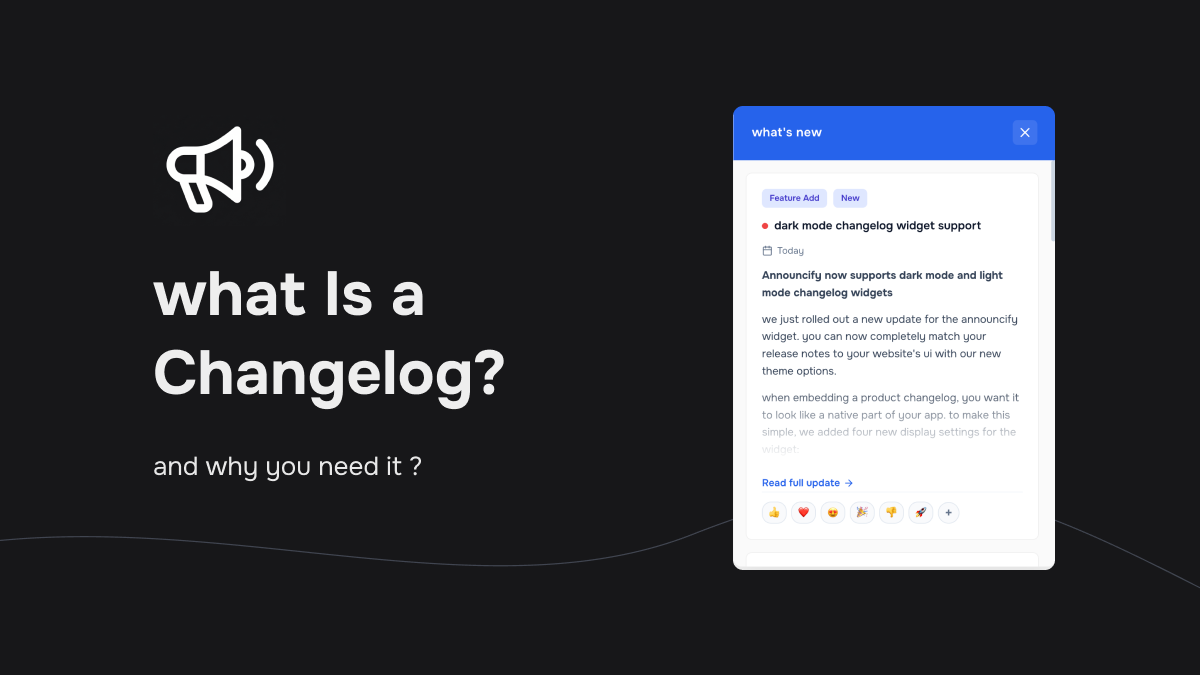
What Is a Changelog?
A changelog is a running record of every meaningful change made to a product. It's organized chronologically, newest entries at the top and gives users a clear, accessible way to see what's new, what's fixed, and what's changed.
A typical changelog entry includes:
The date of the release
The version number (if applicable)
A short summary of what changed and why it matters
Changelogs are closely related to release notes, but there's a key distinction: release notes tend to be one-off documents tied to major launches, while a changelog is ongoing and cumulative, the full product history in one place.
If you want your users to feel like they're growing your product rather than just reacting to it, a changelog is one of the highest-leverage things you can publish.
Users don't just want a good product, they want to trust the team behind it. A public changelog signals that you're not hiding anything. When something breaks and you fix it fast, documenting that fix shows accountability. When you ship a highly requested feature, logging it shows that you listen.
Transparency isn't just nice to have. It's the foundation of long-term retention.
2. It Keeps Users Engaged With Your Product
Most users don't notice improvements unless you tell them. A changelog turns passive users into informed ones. When someone sees that a feature they use got faster, or a bug they hit got fixed, they re-engage with that part of your product and their perception of quality improves.
You're shipping improvements constantly. Don't let that work go unnoticed.
3. It Reduces Support Load
A surprising number of support tickets come from users who don't understand why something changed, or don't know a new feature exists. A well-maintained changelog preempts those questions. Users who check the changelog before filing a ticket often answer their own questions.
Less friction for users. Less noise for your team.
4. It Doubles as a Marketing Asset
A consistent changelog tells a story: this product is actively developed, well-maintained, and getting better. For prospects evaluating your tool, that story matters. A changelog page with regular, thoughtful updates signals that you'll still be around and improving in six months.
Compared to a competitor whose last blog post is from two years ago, an active changelog is a quiet competitive advantage.
5. It Drives Better Product Decisions
When users can react to updates, leave comments, or upvote changes, you get real signal about what they value. A changelog with engagement features becomes a lightweight feedback loop and that feedback is far more actionable than a generic NPS survey.
6. It Aligns Your Team
Internally, a changelog is a single source of truth. "When did we change the billing flow?" — check the changelog. "What shipped in the last sprint?" — check the changelog. It eliminates the archaeology of digging through Slack history or commit logs.
Changelog Best Practices (With Real Examples)
1. Write for Humans, Not Developers
The biggest mistake teams make with changelogs is writing them for engineers instead of users. Jargon, internal ticket references, and overly technical language all create distance between your product and the people using it.
Write in plain language. Short sentences. Active voice.
Bad:Resolved race condition in async task queue affecting webhook delivery latency under high concurrency.
Good:Fixed an issue where webhooks occasionally arrived out of order during high-traffic periods.
Same fix. One is for the user. One is for the commit history.
2. Categorize Your Changes
Not every update is equally relevant to every user. Grouping changes by type — New, Improved, Fixed, Removed — helps users quickly scan for what matters to them.
Loops.so does this well: their changelog neatly segments updates so a power user looking for new features isn't buried in bug fixes they don't care about.
3. Put the Latest Changes First
This sounds obvious, but it matters: your changelog should be reverse-chronological. Users arriving on your page want to know what's new now, not what shipped 18 months ago.
Cycle executes this cleanly — the newest entry is immediately visible with a clear date, and older entries are accessible without scrolling past current ones.
4. Keep Entries Tight, Link Out for Depth
A changelog is not a blog post. Each entry should be scannable in 5–10 seconds. If a feature is complex enough to need a full explanation, write that in a docs article or blog post, and link to it from the changelog entry.
Respond.io is a good model here: one-line entries, "Learn More" links where needed. The result is a page that's fast to read without ever feeling shallow.
5. Always Include Dates (and Version Numbers if You Use Them)
Dates are non-negotiable. Users should always be able to tell when a change happened. If your product uses versioned releases, include the version number too.
Meteor.js is a clean example: every entry has a version tag and a release date. Users can jump straight to the version that affected them without scrolling through irrelevant history.
6. Make It Interactive (Reactions and Comments)
A changelog doesn't have to be a broadcast. Letting users react with emojis or leave comments turns it into a conversation. You find out which updates matter most, which ones need more explanation, and which ones users have questions about.
This kind of micro-feedback loop is gold for early-stage products. You don't need a formal survey when your changelog already tells you what people care about.
7. Make It Easy to Find
The best changelog in the world doesn't help if no one can find it. Put a link in your main navigation, your app header, or your footer, somewhere users already look.
Shopify puts a "What's New" link in their main nav. It's visible, it's clear, and it signals that there's always fresh content to check.
What Makes a Great Changelog Entry?
Here's a quick template:
## [Date] — [Short, Human-Readable Title]

**New — [Feature description in one or two sentences. What it does, why it's useful.]
**Improved** — [What got faster, simpler, or more reliable.]
**Fixed** — [What was broken and is now working correctly.]
Keep it short. Keep it useful. Write it the way you'd explain it to a smart customer over email.
How to Publish Your Changelog with Announcify
Announcify is built for exactly this workflow. It gives indie founders and small SaaS teams a hosted changelog widget they can embed directly in their product, no custom dev work, no maintenance overhead.
Here's how it works:
1. Write an update : Use Announcify's editor to write a changelog entry. Add categories, set a date, and optionally target specific user segments.
2. Embed the widget : Drop a script tag into your app or site. The changelog widget appears right where users are, so they see updates in context — not on some separate page they have to remember to visit.
3. Users get notified : The widget shows an unread badge when new updates are available. Users click, read, and stay informed.
4. Collect reactions : Users can react to entries, letting you see what resonates without any extra tooling.
The whole setup takes under 10 minutes. And unlike building your own changelog page from scratch, Announcify handles the rendering, the notifications, and the engagement layer automatically.
Final Thoughts
If you're shipping code without a changelog, you're doing invisible work. Your users don't know what you built, why it matters, or that you were listening when they filed that bug report two months ago.
A changelog closes that gap. It builds trust. It reduces churn. It turns passive users into engaged ones. And it makes your product look like something worth betting on.
The hard part isn't knowing that you need one, it's actually maintaining it consistently. That's exactly what Announcify is built to solve.
I'm a full stack developer who is passionate about building products that help people. I'm also the founder of Announcify.
Product Updates
Sep 5, 20268 min read
Best AI Release Notes Generators
Manually writing release notes after every deployment takes time. Here are the best AI release notes generators for turning your development workflow into clear, customer-friendly product updates.
 Ahmed Errami